
 Hello and welcome to my web site. I have spend most of my life with Packaging and Information Technology. 11 years as IT Manager for the largest Folding Carton Company in Denmark. 20 years working for Arden Software Ltd. both in UK and as their Scandinavian Agent selling and supporting Impact CAD.
After Arden Software Ltd. established their own Scandinavian Office, IPD Software continued to support Scandinavian Die Makers on consulting basis together with my agency and relationship with Lasercomb GmbH. This year - 2021 - IPD Software has been in busines for 30 years.
2008 IPD Software started the development of FormBase. A unique software package for Order and Production Management to be integrated with Impact CAD to offer Die Makers an all in one solution. 2021 FormBase has been redesigned and moved to Microsoft ASP.Net as a 100% Web Application. FormBase is used by leading Die Makers in Sweden and Finland.
Impact CAD/CAM knowhow + Die Making workflow knowhow = FormBase
Behind the scene, FormBase is a complex piece of software, but on the surface it is easy to use and only a few mouse clicks are needed to create an order. The only thing you type into the system is Customers Die Number and Die Description for reference, the rest is just point and click. Everything in the system can be setup to tailor each Customer individually for Prices, Materials and Workflow. This secure that each Customer is handled the same way each time. Stock Items are linked to Impact's Pallet System together with Customer Machine specifications and Material board grade specifications. A full Bill of Materials are generated from Impact CAD direct into FormBase Parts. As soon as a Project is finished from Impact it will be visible in Production ready to be manufactured.
The Order cyklus is controlled by FormBase "Next Step" status code that will tell operators what to do next. The cyklus guide operators through Creation, Job Cards, Check & Close, Shipping and Billing.
FormBase consist of 4 modules: FormBase Order Management, Production Management, Purchase Management and Customer Zone
FormBase reflects the logical system design of Impact CAD by using identical terms such as Project, Layers and Pallets. All Projects are created in FormBase as Orders. Each Order generates a set of Parts (layers in Impact) from a price list pointing at a pre defined production workflow where the CAD process is included. At this point CAD operators can see a list of all incoming orders with priority, shipping date, customer and product description within Impact. By selecting from this list Impact CAD will auto generate all layers needed for this order. Pallets are linked to FormBase Stock and will return back to FormBase as Bill of Materials. Impact can read and write more than 60 fields in 10 FormBase Tables. There is no interface between the two systems. Everything is done in real time and can be monitored by the Order Manager(s). The two systems is sharing the same database. No other 3. part software is able to this.
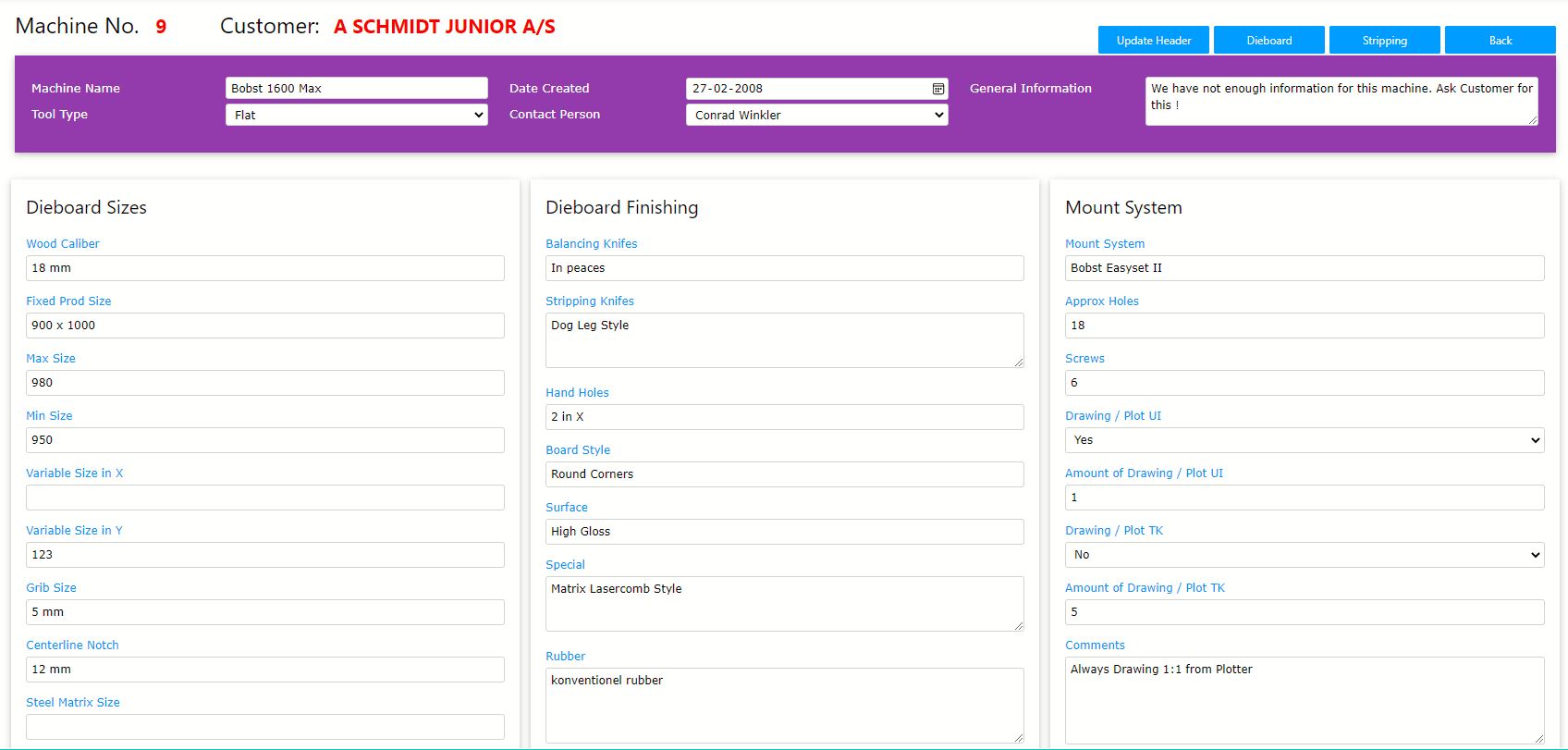
Some basic system files have to be initialized before the system can be used. The Die Company has to be defined in Cost Centers such as CAD department, Plot, Water Jet, Laser, Bending and Cutting, Work Bench for flat and rotary etc. Each Cost Center is created with pricing per hour, budget hours per year etc. for automatic after calculation. Each Cost Center will have a set of Processes defined. The CAD Cost Center will hold all Layers such as Die Boards, Strippig Boards etc. with codes on how Impact will return data back to FormBase. By using these codes FormBase can define if an Impact Layer should return Rule Meters, Laser Meters, Size in X and Y etc.
The Part Builder
The Part builder is a routine used to describe a Part workflow by collecting all needed Processes to manufacture a Die Boards, Stripping Boards etc. Any kind of workflow can be designed. Each Part defined, also have linked a primary Item such as 18mm wood type and Caliber. Each Part also belongs to a Part Group to be displayed as an icon on a planning list for quick overview. When a Part is defined, all Job Cards are pre defined for Production.
The Price List
The Price List is from where each order is defined. The Price List is first of all an Invoice Line but also have a type definition if it should act as invoice line with Fixed Price og Price per meter etc. The Price List also have links to a pre defined Part or multiple Parts. Each Invoice line can have different prices depending on price levels per Rule Meter or Laser Meter. Each line have 10 levels where each level can have either fixed or variable prices per level. If price levels are used, it will be calculated when amount of Rule meters or Laser meters are updated from Impact. Any Price List can be linked to a Customer or used as Default (any Customer). Any Price List can be defined for single or multiple Parts. All price variables are set in percentage so each time a price change appears it is only one place to change the price.
The Price List Catalog
Now and then some Price conditions can't be fit into a standard Price List. In such cases the Catalog is used. The Catalog is a kind of spread sheet where variables can be inserted and price calculated by inserting either Rule meters, Laser meters or any other values. Any Price List Catalog can be linked to a Customer og used as Default (any Customer). Any Price List can be defined for single or multiple Parts.
Favorit Items
Customers often use the same Stock Items for their orders. To make it easier for Order Managers to remember this, any Stock Item can be linked to any customer by define it as a "Favorit" Item. FormBase will, when running the "Check & Close" procedure, convert a Favorit Item into correct Stock Item for after calculation and keep Favorit Item as Invoice text and value.
Stock Items
The Stock Item Table is used by linking Items to the Impact Pallet system. This is done by setting a field value to "Yes" for each Item to be active in Impact. The same way if an Item should be included in Price per Rule meter og not. The "Check & Close" procedure will convert any relevant Items into Invoice lines.
List Views
All data stored in the system such as Order History, Items Used, Item Purchased etc. are always stored with Year and Month for easy monthly overview to be shown per Customer, Items etc.
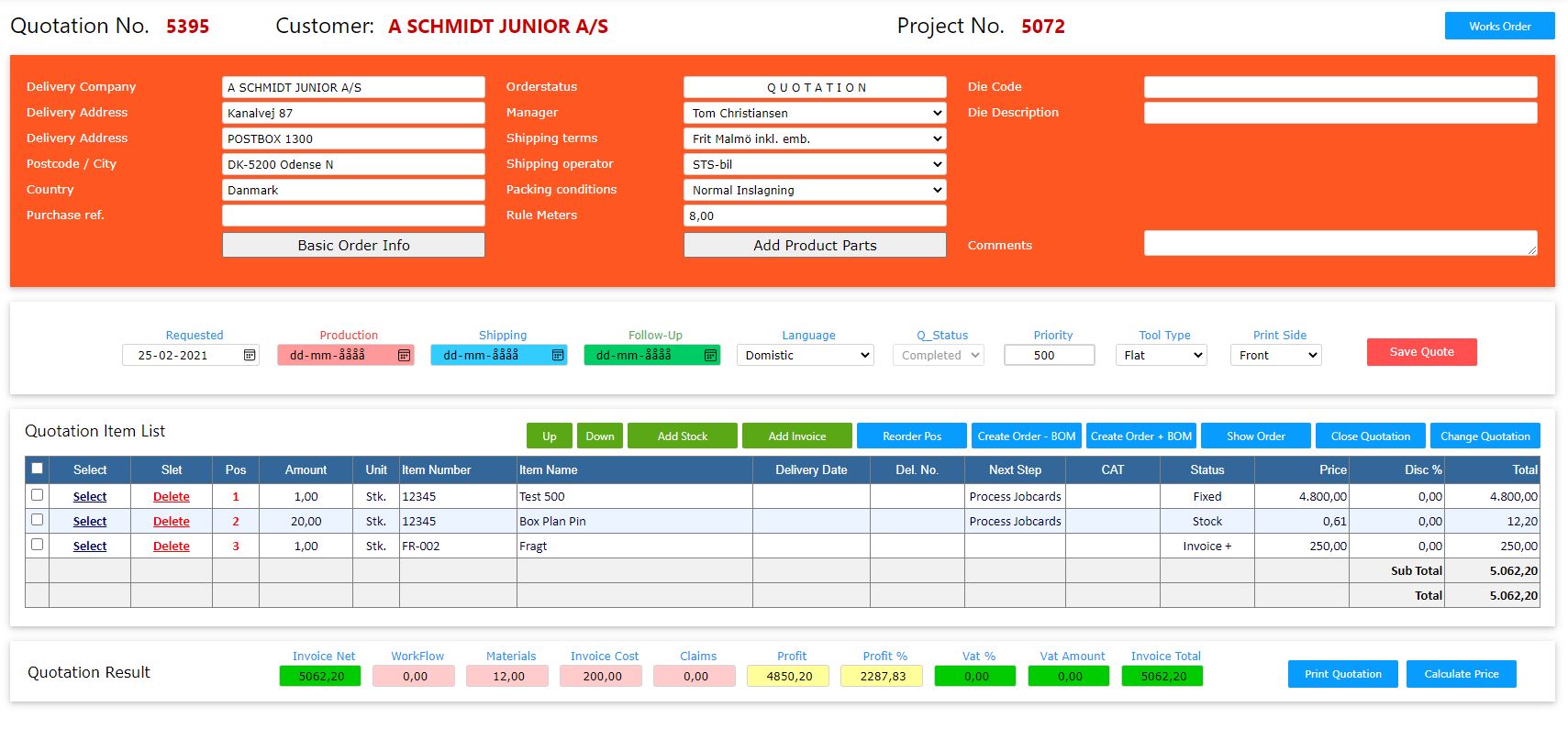
To create a new Order or new Quotation you only need to select a Customer and fill in the Purchase Ref, Die Code and Die Description together with selected Machine and Board Material. Other information will come from Customer Table. In case where more orders has to be created for the same Customer, this procedure can be repeated without entering any informations.
The Order Screen will appear hereafter, where Shipping Date and Production Date is entered. By pressing the "Add Product Parts" button, Order Manager can select all the Parts from the Price List that completes the Order. All Invoice lines and Productions Parts are now created.
The Works Order Screen will now hold all Production Parts to be selected (Select All) and Job Cards will be created for all Cost Centres.
The Order is now visible in Impact CAD where FormBase Parts will create all Impact Drawing Layers.
When Job Card for CAD is Completed, the Order will be visible in Production for manufacturing.
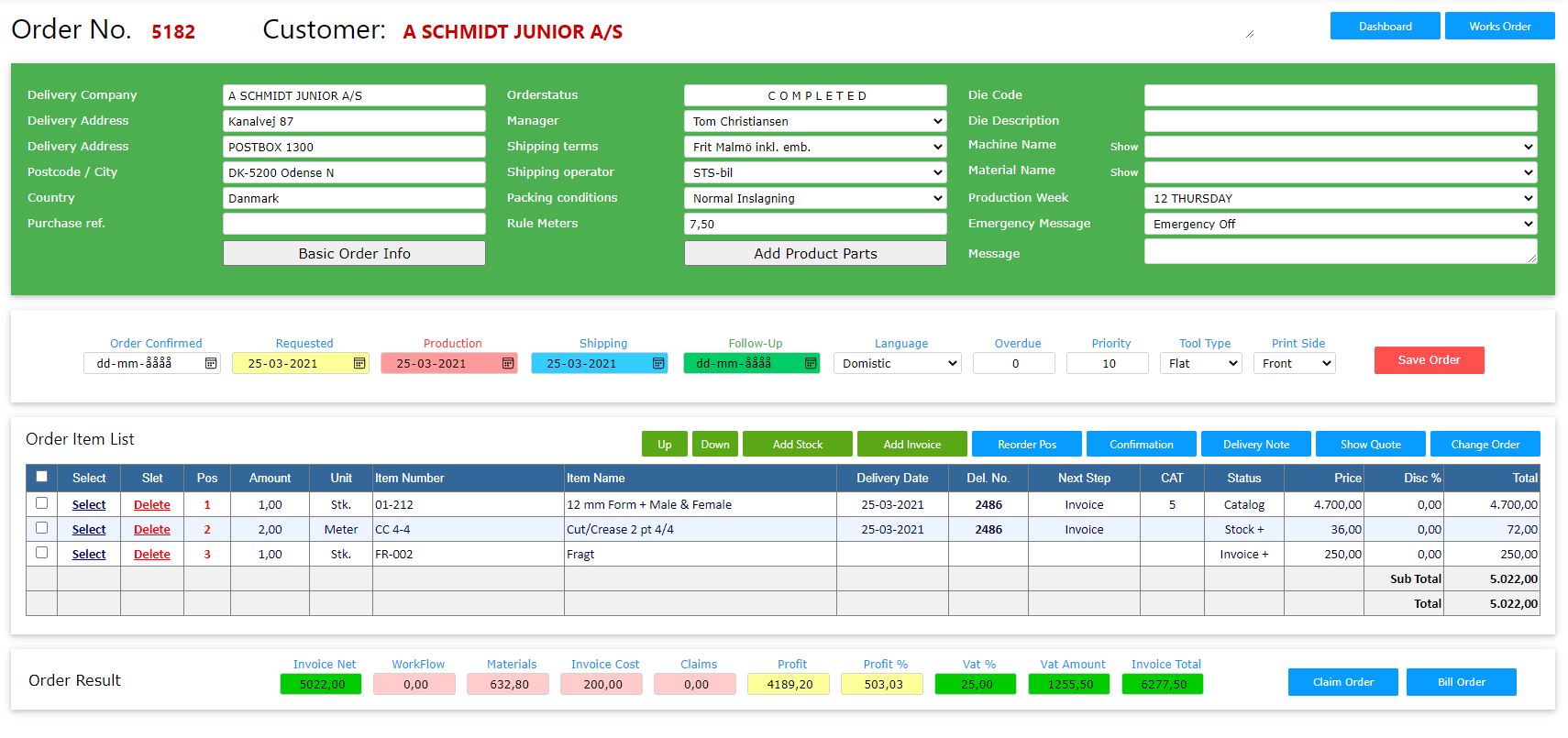
The Order Manager can follow the Order on "Dashboard Processing" to see which Process is active og inactive. The Order Manager will not see the order before it reach the status as "Billing" where Price per Part will be finally calculated according to Price List values and Price Levels per Rule Meter, Laser Meter etc.
To finish the Order, the Order Manager will press the "Billing" button. When this button is pressed FormBase will recalculate all working processes, material used and invoice specifications to generate the after calculation. The result can be seen on the bottom of the Order Screen where Invoice total can be compared to the after calculated values.
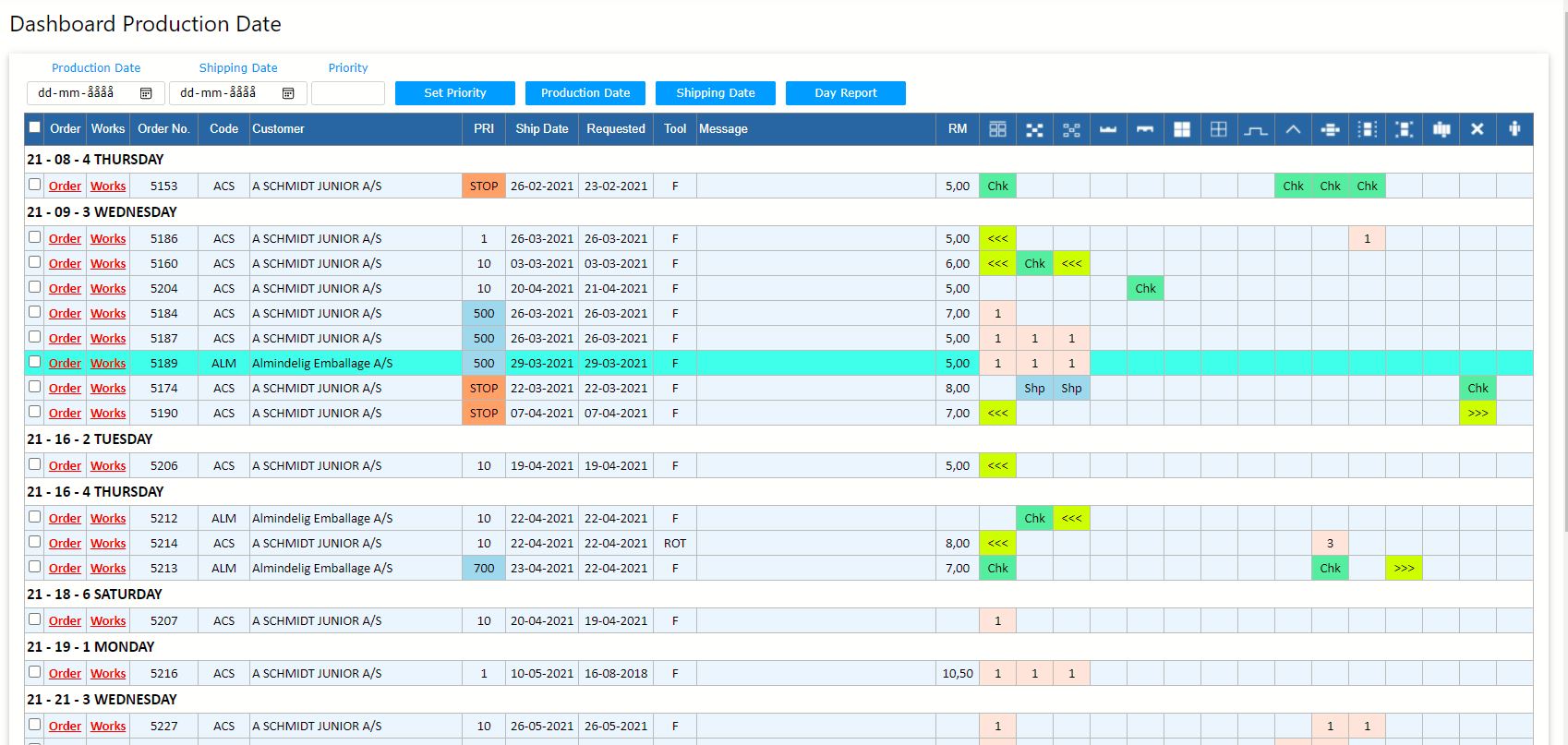
The Production Manager can control each Part in Production regarding Priority and Production Date. All operators see their Jobs on a screen from where they will select Jobs by pressing Start and Stop for each operation. Screens in Production are auto updated each 2 min. for new Jobs or changes to running Jobs. Operators can at any time see an Impact PDF drawing of the Part he is working on. Time is collected and will be shown as Workflow cost at the after calculation. Each time a Job is completed it will disappear from the Screen. In cases where a Job is checked and errors are found, Operator can return a Job back for correction. FormBase will then create a new Job Card for this. When all Processes from an Order Part are finished, the Part will show in the Dashboard "Check & Close".
To move the Order from "Check & Close" to "Shipping" the Check & Close procedure is performed by pressing one or more check boxes. FormBase will then calculate all Processes, Materials used and create cost totals. All materials used will be redrawn from Stock and a check for low Stock will be performed. Stock Items set to "Auto Reorder" will if stock amount is below the reorder point be automatic reordered and placed on the Purchase Booking List. All materials not included in the Rule meter price will be converted into Invoice lines with sales price. Favorit Items will be split into Stock Items and Invoice lines.
Orders now showing in the "Shipping" Dashboard are ready for printing of Delivery Notes and Labels. After Delivery Notes are printed the Order will disappear from Production. Order Status will now be "Billing" and visible in the "Billing" Dashboard from where the Order Manager can prepare Invoicing.
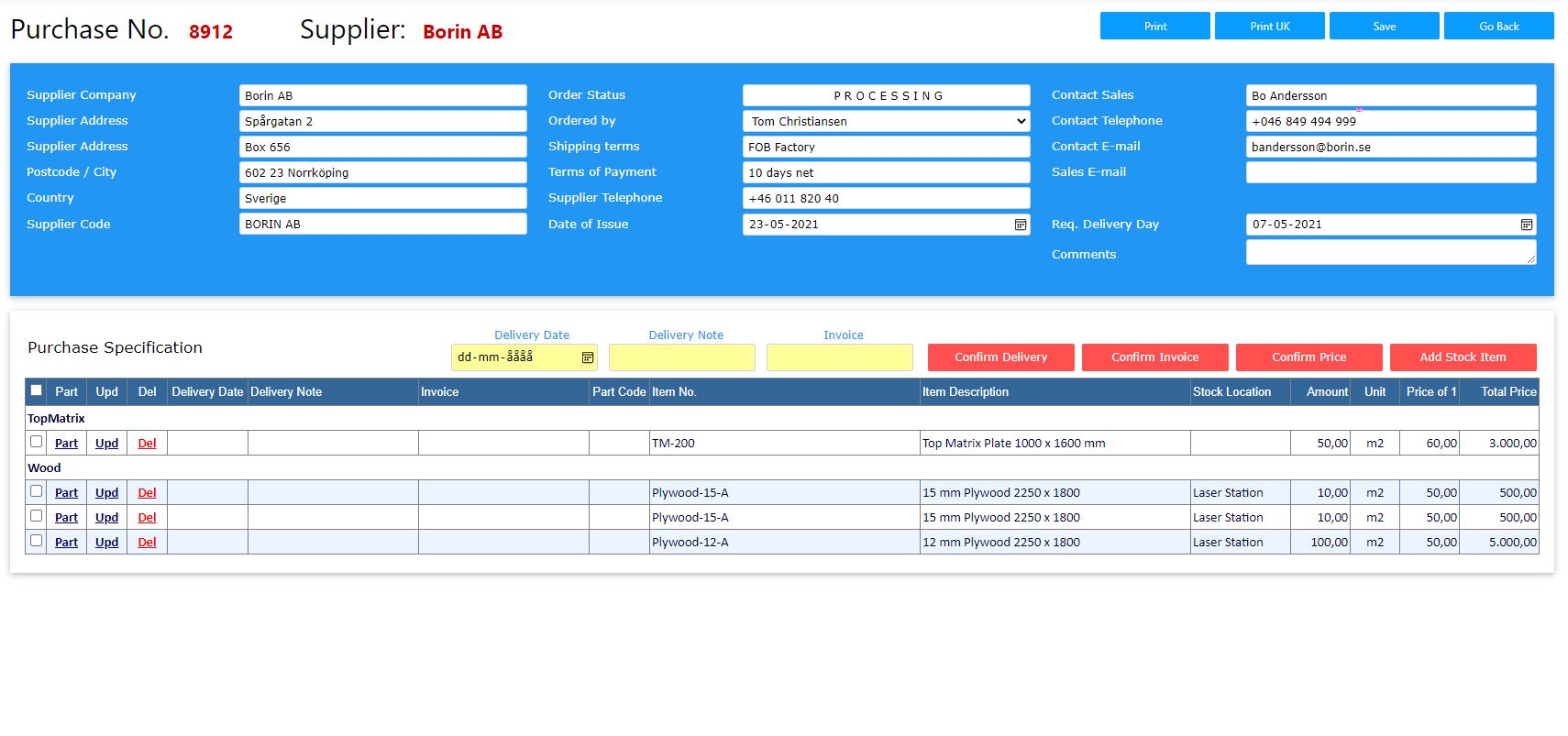
Purchasing is done by selecting one or more check boxes in the Stock Item list. By pressing the "Booking" button all Items will be visible in the Purchase Booking list including amount to order if Reorder Amount has been specified together with unit size, unit price and total. The Booking list is sorted in Suppliers and includes bookings from both "Check & Close" and manual stock bookings.
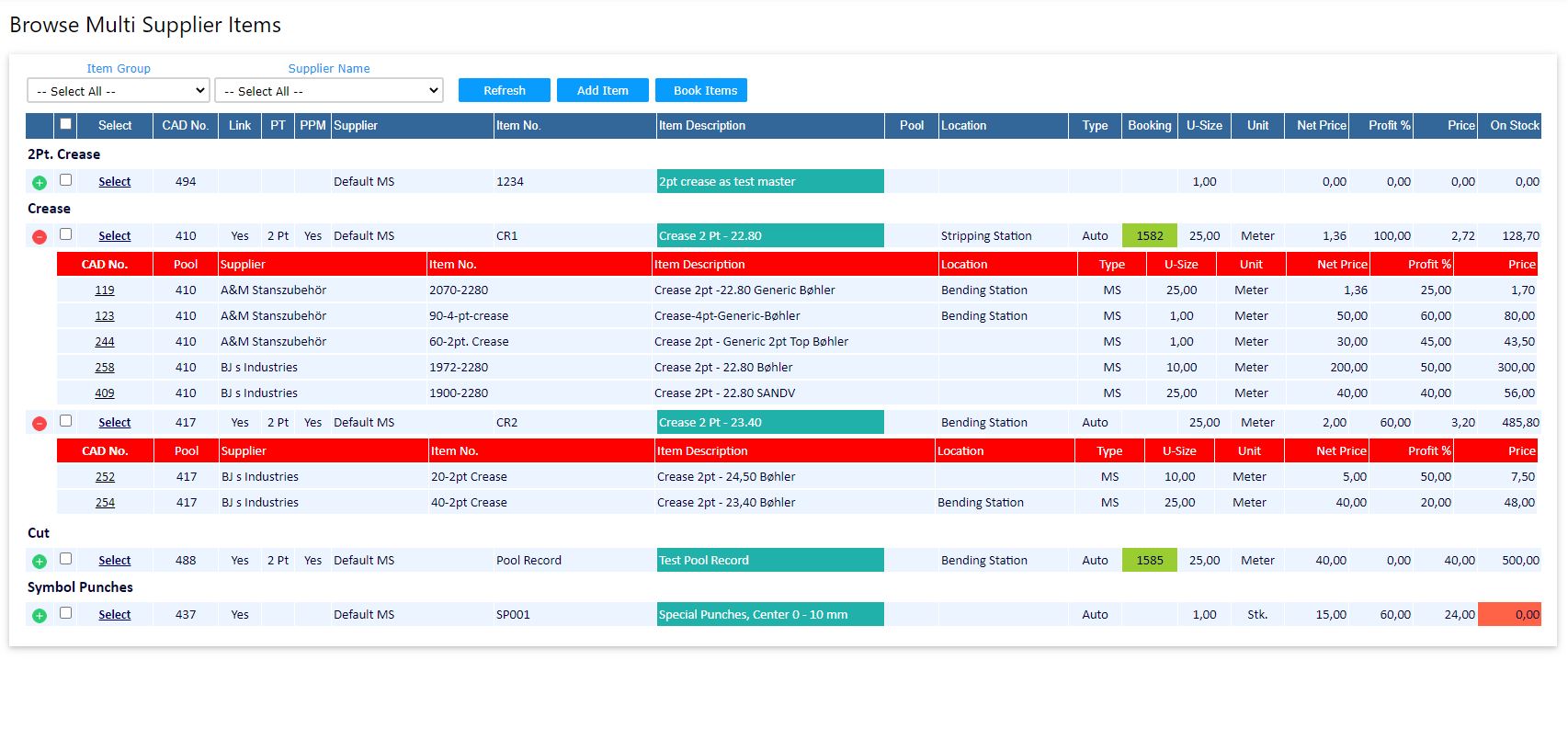
When bookings are done for an Item set as "Multi Supplier" the Purchase Manager can select the Item and then from a list select the Supplier to purchase from.
When ready to purchase from the Booking List, "Select All" to the list and purchase orders are generated for all Suppliers. Records are now removed from the Booking list and can be Printed from "Pending" orders.
Stock Items can hold one QR Code and one Code39.
As FormBase being a Browser based solution, it is easy to connect Customers to the system. FormBase Zone allows Customer to create their own orders and upload CFF2 or Impact Files to the Web Server. This of course will reduce the time for Order Managers that now only need to set Production Date, Shipping Date and create Job Cards.
The Customer can follow production steps and see Order History and Invoice. PDF drawing of production Parts can be viewed.
Orders are kept in the database as long as needed, but if using the "Year Maintenance" routine, all Tables where records are added daily can be minimized to hold data for 5 years only. The amount of data will be stable and the system can in principal run for ever.
This Software is only relevant to Die Makers using Impact CAD. Required environment is SQL Server, IIS Web Server, MS Edge or Chrome Web Browsers.
If you are interested to licence, resell or purchase FormBase, please don't hesitate to contact me by e-mail.
created with
Website Builder Software .